
Provider Directory Service
Use the Search Provider Directory Service window to search Argus online for an individual or organisation and create a record in your local address book.
Before you can search the Argus online, you must first enable the Address Book Integration - ADHA PDS module and configure the PDS service. For more information, see Modules.
To search the online provider directories, you must belong to a user group that has the Address Book Maintenance system right.
| Communicare search fields | PDS search fields - Individual | PDS search fields - Organisation | Description |
|---|---|---|---|
| Name | Full name | n/a | Provider name |
| Organisation | Organisation | Practice name | Healthcare service name. Organisations can have one or more Healthcare Services at a Location. |
| Department | n/a | n/a | Department is not available in PDS |
| Speciality | Specialty | Specialty | Must be used in combination with other filters |
| Provider Number | Provider number | n/a | Provider number |
| Locality | Location type & Location value | Location type & Location value | Must be used in combination with other filters
|
| n/a | n/a | Service type |
Must be used in combination with other filters Values are taken from SNOMED services and include: community, social, transport, voluntary |
- Specialty
- Organisation
- Location
- SMD Vendor
- Practice name
- Location
- Organisations can have one or more Healthcare Services at a Location
- Multiple specialties at a single Location can be one Healthcare Service, or multiple specialties with the same Organisation and Location
- SMD Vendor
-
In the Address Search Book window, enter a name or
organisation, or other search criteria.
If a result is listed and it displays the
 Provider Directory icon, the result is already linked to the online
provider directory.
Provider Directory icon, the result is already linked to the online
provider directory. -
In the Search Provider Directory Service window, do either
of the following and click
 Search.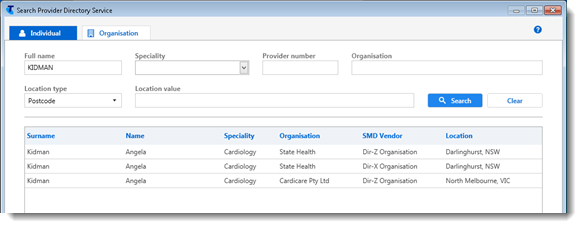
- On the
 Individual tab, if required enter further
details for the provider for whom you want to search.
Individual tab, if required enter further
details for the provider for whom you want to search. If an individual provider is registered at more than one organisation, or with more than one SMD vendor, they will be listed more than once as shown.
- On the
 Organisation tab, if required enter further
details for the organisation for which you want to search.
Organisation tab, if required enter further
details for the organisation for which you want to search.If an organisation is registered at more than one location, with a separate specialty or with more than one SMD vendor, they will be listed more than once.
- On the
Provider Directory icon. 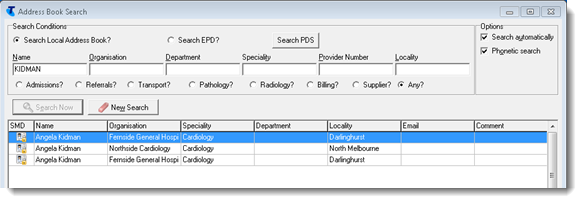
In your local address book, for contacts copied from an online provider directory, most fields are not editable. If there have been any changes to the contact in the online provider directories, the contact is updated from the provider directory when the CCareQueue_SMD service is run. Any changes you make to the contact locally are overwritten from the online provider directory each time the GracePeriodHours is reached.
If a contact is removed from an online provider directory, it is also removed from your local address book. If you delete a contact from your local address book that was added to your local address book from the online provider directory, the PDS is not affected. To add the contact back into your local address book, repeat the online provider directory search described above.
Repeat steps 3-6 for each record that you want to add to your local address book.