
User Lock Conflicts
Sometimes there are data entry conflicts and the database is locked to protect the integrity of the clinical record.
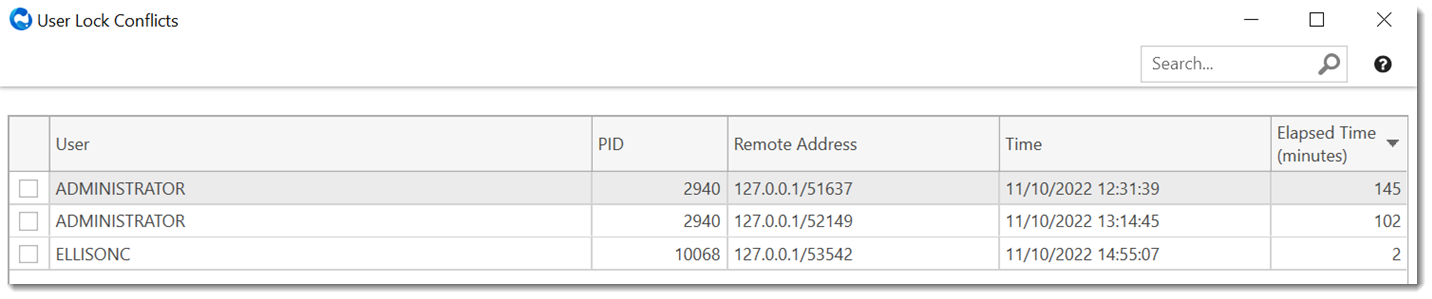
Use to manage user lock conflicts. Only System Administrators can access this window.
The User Lock Conflicts window lists all the active connections
to the database other than the current, logged in user.
Note:
An entry in the User Lock Conflicts window does not
necessarily indicate that there is a problem. If you see a user in the list, you
should not clear their session unless they are getting messages advising that the
record is locked. For example:
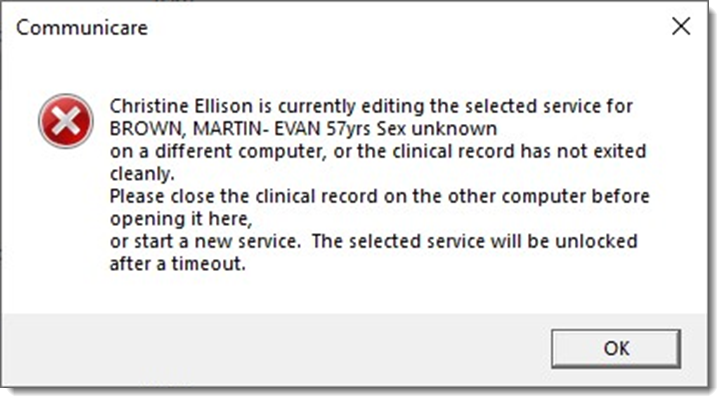
User lock conflicts can occur in the following circumstances:
- When multiple users attempt to edit the same information
- If a single user has multiple sessions on different computers
- If there are network problems
Note:
Only use unlock to resolve user conflicts as a last resort.
To resolve a user lock conflict:
The user is disconnected from the database, the user lock is resolved and the user lock conflict is cleared.
THe user should now be able to log in again.