
Add a clinical item to a patient's record
Record a patient's history, conditions, check ups, procedures, immunisations, referrals, admissions and alerts using clinical items.
- Calculator - assessment and audit clinical items, for example, for Kessler 10 for mental health assessment or alcohol consumption audit
- Check up - general items, for example, for Aboriginal and Torres Strait Islander or Women's Health check-ups
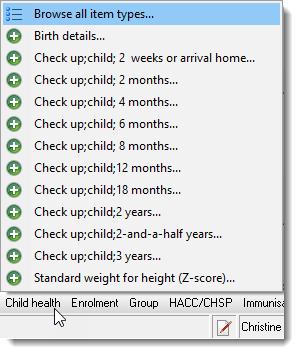
- Child health - items for children's check-ups including birth and age-based development checks
- Enrolment - items for enrolment in alcohol-related programmes
- Examination - items for examinations grouped by clinical item topics, for example, cardiovascular or respiratory
- Group - items for group work, for example, counselling or educational groups
- HACC/CHSP - items related to HACC or CHSP
- Immunisation - items for immunisations
- Referral - clinical items for referrals grouped by specialty, for example, dentist or paediatrician. Specialists should be included in the Address Book and marked for Referrals.
- STI - clinical items for STI screening or treatment.
- Shortcut to a clinical item for commonly used clinical items
- Clinical items search
-
In the patient's clinical record, click
 Clinical Item or press
F11.
Clinical Item or press
F11.
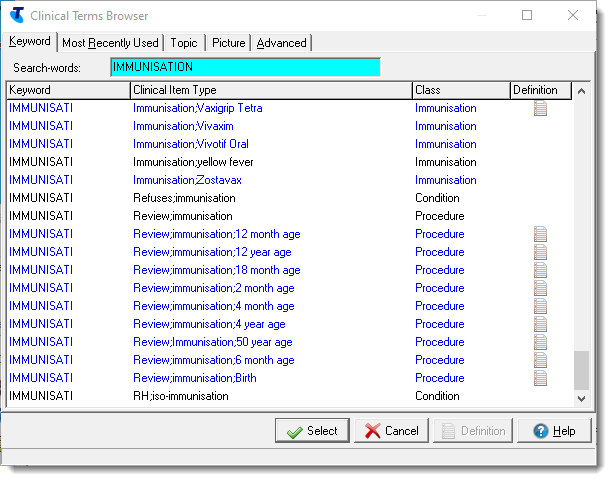
- In the shortcut bar, click the required group and select the required
clinical item from the list.
- Complete the required fields.
- Click Save.
Information you provided in the clinical item is displayed on the Progress Notes tab and is summarised on the Detail tab.
To print a clinical item, click Print & Save. After printing the clinical item, your changes are saved and the item is closed.
If the clinical item currently being added is a Referral, you can generate a CDA e-Referral document for the patient. An e-Referral can be uploaded to the My Health Record or sent via Secure Messaging within the first 8 hours of saving the document. To generate an e-Referral, click Save & Create eReferral. The clinical item is saved and closed, and an e-Referral is opened. To learn more about the e-Referral document type, see e-Referrals.