
Send HealthLink SmartForms
Send eReferrals and other forms from Communicare using HealthLink SmartForms.
Your Communicare instance must be configured to integrate with HealthLink SmartForms.
HealthLink SmartForms allow organisations receiving eReferrals or other forms to standardise the data required.
Each HealthLink SmartForm contains:
- Default data set by HealthLink
- Data imported from Communicare
- Fields to be completed manually by the clinician
To send a form from Communicare using a HealthLink SmartForm:
-
In a patient's clinical record in Communicare, select
 Go To >
  HealthLink SmartForms.
-
Complete the eReferral form.
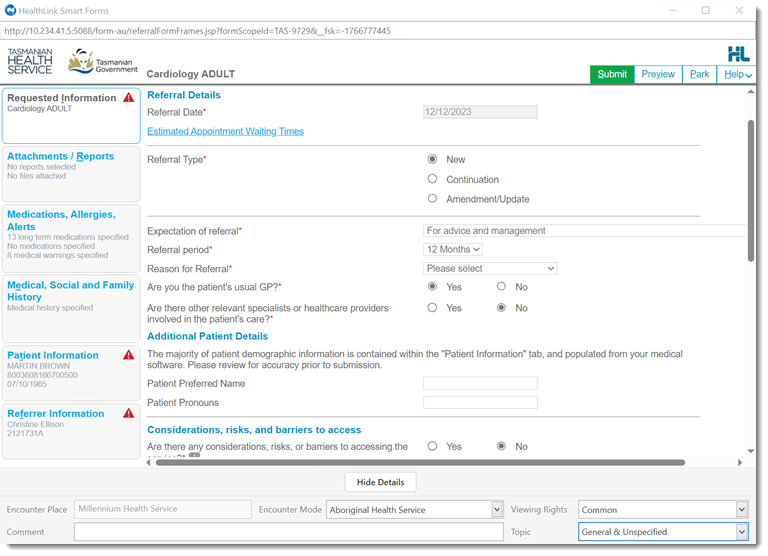
- In the form, complete the mandatory fields.
- Review the data imported from Communicare and update it if required. For more information, see HealthLink SmartForms Data Mapping.
- Attach documents and reports as required. For more information, see Documents.
Submitted forms are sent securely to the recipient and a summary
of the information sent in the form is displayed as HTML or a PDF. This summary is
also saved to Communicare. Print the summary if required.
Note:
HealthLink SmartForms do not use the Communicare default printer settings set in
Printer Assignments.
If the form fails to send, it is saved and parked and an error message from HealthLink is displayed.
In Communicare,
submitted forms are listed in the patient's clinical record, on the  Progress Notes tab, prefixed with <Sent>
SmartForm "comment".
Progress Notes tab, prefixed with <Sent>
SmartForm "comment".

Progress Notes tab, prefixed with <Sent>
SmartForm "comment".Submitted forms are also displayed in the following locations with the document name
SmartForm "comment" and a
status of Sent. For example SmartForm
"Cardiology - Primary Health Tasmania".
- The patient's clinical record, on the
 tab.
tab.
 tab.
tab. Tip:To display an HTML or PDF summary of the SmartForm sent, double-click the SmartForm in the list.
Incomplete, parked forms are listed with a status of Saved.
- Viewing rights are respected. Only clinicians who belong to the set user group can view the document.
For some recipients,
forms are sent asynchronously using SMD. Forms sent asynchronously show a status
of:
- Pending until an acknowledgement message is received.
- Sent when an acknowledgement message is received with a successful state.
- Error if a form is rejected or fails. To deliver the form to the recipient using an alternative method, open the form and print it to PDF.
Tip:
To open a sent SmartForm, double-click it on the
Progress Notes or Detail
tab.
If you parked an incomplete form or a form failed to send, from Communicare, resume it. For more information, see Edit HealthLink SmartForms.