
Use HealthTracker
When HealthTracker™ configuration is complete, clinicians can add the George Institute HealthTracker clinical item to a patient clinical record and generate a HealthTracker™ report.
In Communicare, the George Institute HealthTracker clinical item can be used in the same way as any other clinical item.
-
In Communicare, in a patient's clinical record, click
 Clinical Item.
-
Complete the information on the HealthTracker tab or
section.
Tip:Information on the other tabs is provided by The George Institute after a patient's information is sent to them.
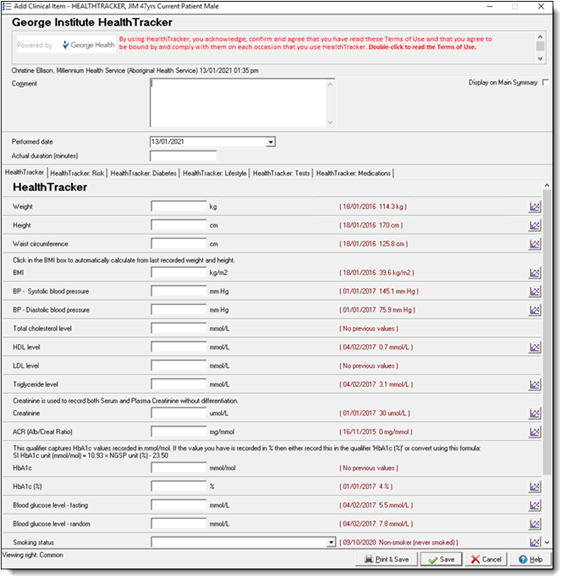
To provide the most accurate report the following qualifiers and data elements are required:- Items required for the CVD risk calculation:
- Age
- Sex
- Total cholesterol
- HDL
- Blood pressure
- Smoking status
- For other HealthTracker™recommendations, also include:
- Aboriginal or Torres Strait Islander status/ethnicity
- Weight, height
- Diabetes-related risk factors, such as, Albuminuria (ACR), Fasting blood glucose, HbA1c
- CKD-related risk factors, such as, Creatinine
- CVD-related risk factors, such as, LDL, Triglycerides
- Other relevant history:
- Past medical history
- Medications
- Family history recorded in the following Family History
clinical items:
- FH: Chronic Kidney Disease
- FH: Diabetes Mellitus
- FH: Cardiovascular Disease <60
- FH: Myocardial Infarction 45-60
- FH: Myocardial Infarction <45
- FH: Myocardial Infarction >60
When adding information:- The latest recorded qualifier measurements are displayed in red text next to the data entry field. Enter new measurements in the input fields during a service.
- If a new qualifier measurement is not added, Communicare sends the latest existing qualifier measurement to the HealthTracker system for inclusion in the report.
- Items required for the CVD risk calculation:
The data you provided is sent in an encrypted form for analysis by the HealthTracker™ algorithm.
Based on the patient’s qualifier measurements, history, biographics, medications and conditions, the HealthTracker™ produces an interactive report and displays it in the default browser. The report may take several seconds to generate, and the Communicating with George Institute window is displayed until the results are returned.
- Error 101 - shown when the service encounters an error while accessing the database
- Error 102 - shown when the service encounters an error while accessing the George Institute HealthTracker Service
- Error 103 - shown when the service encounters an error related to data validity and when the service response status code is non-200
- Error 104 - shown when the required settings for George Institute HealthTracker Service are not set
- Warning - shown when the value of an input qualifier falls outside the valid range
Review the report. The report can be used interactively: demonstrate to patients how reducing a risk factor such as smoking can affect the patient's risk and provide tailored advice to assist with the management and prevention of cardiovascular disease, diabetes and chronic kidney disease.
If required, based on your review, edit the output qualifier fields and add notes or additional information before saving the clinical item. The returned results become part of the clinical item record for the patient. Details are also saved as a progress note.