
Submit a claim to Medicare
If your health service is integrated with Medicare, you can submit an electronic claim either when you close a service if you are the provider, or later if you are a receptionist or claims manager.
 Save, or click Not claimable.
 Tip:
If a clinical
item used in the service is linked to an MBS item for your site, the item is
selected automatically.
To submit a Medicare claim:
-
Open the Service Record window.
- If you are the provider and you are submitting the Medicare claim:
- In the Clinical Record, click
 Close.
 - Click Yes - This service is now complete or No - Patient will see another provider.
- In the Clinical Record, click
- If you are the receptionist:
- Click
 Service
Recording.
Service
Recording. - In the Service Recording window, double-click the patient for whom you want to submit a claim.
- Click
- If you are the provider and you are submitting the Medicare claim:
-
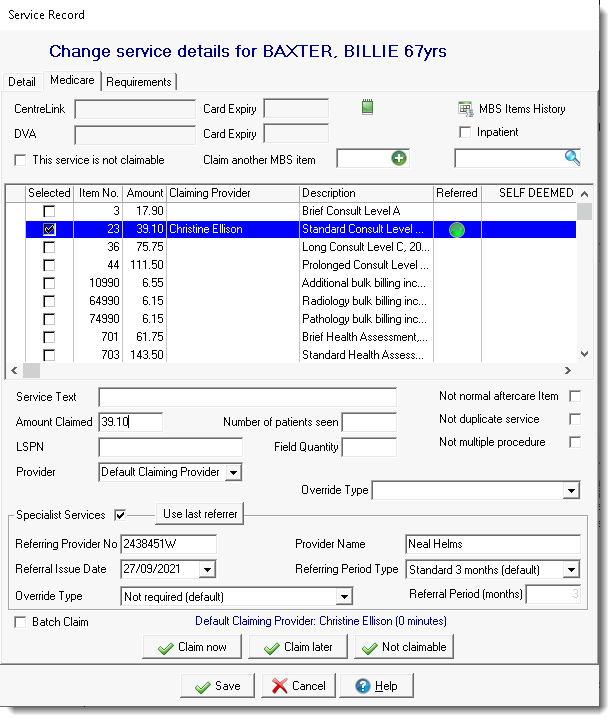
In the Service Record window, on the
Medicare tab, check that the provider listed as
Default Claiming Provider is correct (listed above
the Claim now button). If the provider is incorrect, on
the Detail tab, select the correct provider.
Tip:In the Service Record, for patients whose Medicare Card details are incorrect or incomplete, a
 Medicare Incorrect icon with a red slash through it is displayed. To
validate the patient's Medicare details, click Medicare Incorrect. For patients with a valid Medicare card or whose
details have been verified with Services Australia but with suggestions, no
icon is displayed.
Medicare Incorrect icon with a red slash through it is displayed. To
validate the patient's Medicare details, click Medicare Incorrect. For patients with a valid Medicare card or whose
details have been verified with Services Australia but with suggestions, no
icon is displayed. -
Review the information that relates to all items claimed.
- To view or edit administration notes related to the claim, click
 Admin notes.Tip:This is useful for doctors to add claim notes for the claims administrator.
 - If enabled, to claim the items as an Inpatient Service, select Inpatient.
- To view or edit administration notes related to the claim, click
-
To display previous items that have been marked for claiming for this patient,
whether they have been paid or not, click
 MBS Items History.
-
In the list of items, select an item. Most common MBS items are listed.
- If the item you want to claim is not listed, either:
- If you know the number of an item which is not listed, in the
Claim another MBS item field, enter
the number and click
 Add.
Add. - Search for an item:
- Click
 Search.
 - In the Search MBS Items field, enter a search term. For example, pregnancy.
- In the list, select an item and click Select. The item is added to the list in the Service Record window and is selected.
- Click
- If you know the number of an item which is not listed, in the
Claim another MBS item field, enter
the number and click
- If you want to claim an item more than once, right-click the item and select Add this MBS item again.
- If you want to claim an item that does not have a simple fee (such as a home visit), right-click on the item and select Display the derived fee description for this MBS item. Using the description, fill in the details required (for example, amount claimed, number of patients seen, and so on).
- If the item you want to claim is not listed, either:
-
Below the list of items, select the details that apply specifically to the
selected item:
- In the Amount Claimed field, if the amount you want to claim for this item is different to the default, enter the correct amount.
- If this item was provided by a location-specific provider, such as an x-ray machine, in the LSPN field, enter its number.
- From the Provider list, select the provider who is claiming the selected MBS item if different from the default provider listed above the buttons.
- You may need to provide other information specific to your health
service in the other optional fields, including:
- Service Text
- Number of patients seen
- Field Quantity
- Self Deemed
- Override Type
- If the item being claimed requires details of a referring provider,
select the item, select Specialist Services and
do one of the following: Note:Referral details are only included once for each claiming provider, so select only one item per specialist claiming provider.
- Complete the specialist's and the referral details
- To add details of the last referring provider for the patient, click Use last referrer.
- If the referral has a custom referral period, from the Referring Period Type, select Non-standard and enter the referral period in the Referral Period field.
- From the
Override Type list, select an
override type:
- Lost - do not provide any referring provider or referrer information.
- Emergency - do not provide any referring provider or referrer information.
- Hospital - also set Inpatient which includes the Hospital Facility ID for the encounter place in the claim. Do not provide any referring provider or referrer information.
- Referral Provider Details will be submitted - include a referring provider number and submit the referral separately.
Tip:If Specialist Services is selected and details are complete, a green dot is displayed in the
Referred column for the claim
item. If it has been selected, but some details are missing,
a
green dot is displayed in the
Referred column for the claim
item. If it has been selected, but some details are missing,
a  yellow dot is displayed.
- Complete the specialist's and the referral details
- You can also set whether an item is Not normal aftercare items, Not duplicate service or Not multiple procedure.
-
When you are confident that the items to claim are correct, click Claim now.
If you have MBS incentive items set for your organisation or encounter place, for eligible patients you are automatically prompted to also include the incentive item appropriate to your region. In the Confirm window, click Yes.
The claim is queued to submit electronically to Medicare Online when CCareQueue_ServicesAustralia next runs.
If you submitted a claim incorrectly, correct it as quickly as possible. See Correcting Medicare Claims for more information.
In the Service Record window, on the
Medicare tab, next to each item claimed there is an icon
showing its status. These icons are also displayed when you open the
Service Record from the Online
Claiming window:
 Claim sent or
claim pending
Claim sent or
claim pending Claim
rejected
Claim
rejected Claim paid
Check details of Medicare claims on tab. For more information, see Bulk Bill Claims (Online Claiming).