
Running and uploading PMHC reports
Run the PMHC reports to generate a file containing data from the PMHC clinical items, which you can then upload to the PMHC portal.
Use the following reports to generate Microsoft Excel spreadsheets for submission to
the PHN. Run these reports from .
- CLIENTS
- COLLECTION OCCASIONS
- EPISODES
- IAR DST
- INTAKE EPISODES
- INTAKES
- K10P
- K5
- METADATA
- Portal Error Details
- PRACTITIONERS
- SDQ
- SERVICE CONTACT PRACTITIONERS
- SERVICE CONTACTS
For details about the program or the content of the items, and for information relating to the upload, contact your local PHN.
Note:
Some optional information is not captured, such as the year of birth of the
provider. Communicare V22.1 and later includes K10 and K5 assessment items but not
the SDQ. If you already have an SDQ in Communicare, contact Communicare
Support for advice on export codes required to ensure the reports find
these items.
To extract the PMHC data from Communicare:
-
Repeat for each of the PMHC reports you need to run.
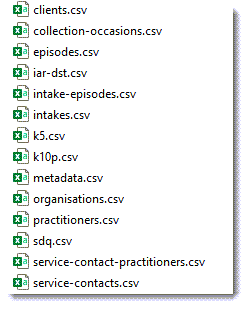
To upload the files to the PMHC portal, follow the instructions provided by PMHC.
For details of the program or the content of the items, and for information relating to the upload, contact your local Primary Health Network.
For questions about where the reports find the data they require, contact Communicare Support.