
Adding a new user
To add a new user to Communicare, you first add them to a user group and then assign additional access.
Communicare organises users into groups. All rights to access Communicare modules and information are allocated to User Groups.
If your Communicare user groups have been synchronised to Active Directory, for information about SSO, see Active Directory integration.
- Change or modify any part of the database.
- Bypass audit mechanisms and audit logs.
- Backup and restore the database, including across the network.
Typically you would not create a partner account in the System Administrators user group. However, other user groups have limited access to certain database tables, views and stored procedures, so third party applications may encounter errors when used with a limited user if they were designed assuming administrator access.
-
On the Users tab, click
 Add User.
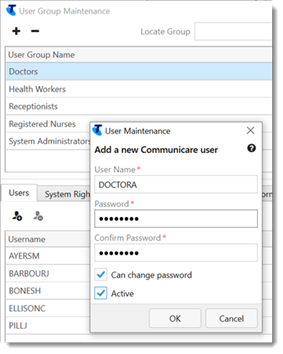
The new user is added to the list of users on the User Group Maintenance window. Here, you can move users from one group to another and delete users.
The system rights, viewing rights, program rights, formulary rights, and scope of practice for the selected user group all apply to the new user.
If the new user is anyone who provides healthcare for a patient, such as, a doctor, health worker, or nurse, now add them as a provider.
If you set Can change password in step 6, to reset their password, users can select .
To reset a user's password, at step 2, double-click a user, then repeat steps 4-8.