
Active Directory integration
Communicare user groups can be synchronised to an Active Directory group so that a user's Microsoft Windows and Communicare logins can be managed from one location and users can use single sign-on.
- Usernames cannot be longer than 31 characters, including the domain name and a backslash.
- All staff using Communicare will need to be included in an Active Directory group. Active Directory synchronisation will hide the username and password field in Communicare to allow for single sign-on functionality.
- Existing users will lose any local Communicare settings and favourites, which
will return to default settings, including:
- Words added to the spellcheck dictionary
- Report parameters
- Report favourites list
- Default Provider, Encounter Place, Mode, Program
- Tools menu – Show Hints, Button Captions, Show status bar
- Recently Used clinical items on the Clinical Item search window
- Appointment Book filters
- Patient Search filters
- Last selected options on qualifier and centile charts
- Last selected filter on the clinical record Detail tab
- Prescription defaults
- Non-public dosage instructions
- Window dimensions (if resized)
- User medication favourites list
- Printer Assignments
- Existing Intramail messages sent only to these users and not saved to progress notes
If single sign-on has been enabled by Communicare Support, additional options will be visible in to help manage the integration with Active Directory.
-
So that you can synchronise your own group to Active Directory, to login to
Communicare for the first time after the upgrade, right-click on the Communicare
shortcut and add fbauth to the target parameters. This
allows you to login in using your Communicare username and password.
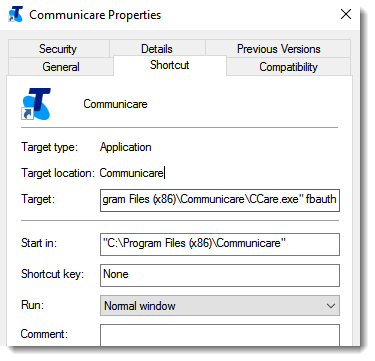
Remember:Remove this parameter from the shortcut once you have synchronised the Active Directory group containing your Windows user name. -
Synchronise your Communicare user group with Active Directory:
- Select .
- In the User Group Maintenance window, click
 Add or double-click a user group.Note:A synchronised user group should not contain any uses who aren't Active Directory users. If you are synchronising a previously existing Communicare user group, any remaining non-Active Directory usernames should be deleted.
 - Enter the user group name and the corresponding Active Directory group
exactly as it appears in Windows and click
OK.
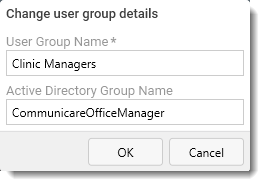
- Click
 Synchronise (above the group's user list) or click
Save.
Synchronise (above the group's user list) or click
Save.
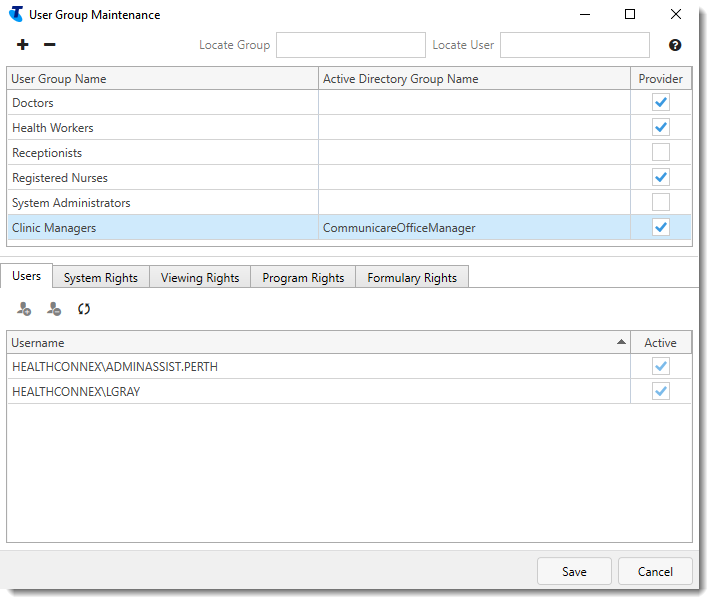
Users in nested groups will not be brought into Communicare.
Although Active Directory users can belong to multiple groups, a Communicare user may only exist in a single group. Thus, if a user belongs to multiple mapped groups, they will only reside in the last group to be synchronised.
In groups that are mapped to Active Directory, the Active Directory users cannot be manually removed, moved to another group, or edited.
To synchronise Communicare user groups to Active Directory in subsequent logins, you need only complete step 3.
A background process can be enabled to automatically synchronise all Active Directory user groups with Communicare. The default is once daily 4:00pm - 4:30pm. Ideally, the synchronisation should be just before your scheduled Communicare backup runs.