
Book Appointments
After you have configured your session templates and sessions have been inserted, either manually or automatically, you can book appointments.
The appointment book provides a one-day view. The sessions for a provider are listed in a
single column. Each cell in the column is a single appointment timeslot. Different providers
may have different length appointments, so times may not be aligned across the grid.
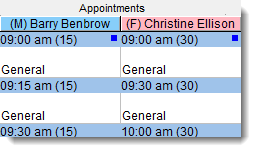
In this example, Dr Benbrow's appointments are 15 minutes long, while Dr Ellison's appointments are 30 minutes long. The time of the appointment and its length are displayed in the blue banner for each timeslot.
Tip:
Appointment timeslots during public holidays and
planned absences are not displayed. Instead, a single cell is displayed giving details of
the holiday or absence so that you can see why no appointments are available and when a
provider will be back from leave.
To book an appointment:
-
If your health service books appointments from more than one workstation, to update
your display to the latest appointment details, click
 Refresh or press F5.
-
Search for a free appointment slot:
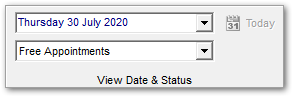
- To search for a free appointment for today or a specific day, in the View
Date & Status pane, select Free Appointments.
The Appointment Book displays only free appointment timeslots.
- If there are no appointments available today, or for the selected date, to search
for the next available appointment:
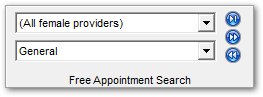
- In the Free Appointment Search pane, select which
providers (all, female or male) and the type of appointment the patient
requires.
- Click
 Play to go to the first day with available appointments.
 - If there are no suitable appointments on that day, click
 Forward to go to the next day with available appointments or
  Back to go to a previous day with available appointments.
- In the Free Appointment Search pane, select which
providers (all, female or male) and the type of appointment the patient
requires.
Tip:To return to today's appointments, click Today.
 - To search for a free appointment for today or a specific day, in the View
Date & Status pane, select Free Appointments.
The Appointment Book displays only free appointment timeslots.
-
If the patient requires a double appointment, select two adjacent timeslots and click
 Merge.
Tip:If you later need to make this timeslot two single appointments again, select it and click
Merge.
Tip:If you later need to make this timeslot two single appointments again, select it and click Unmerge.
 -
Select a free appointment timeslot and click
 Book or press CTRL+Enter.
-
In the Select patient to book appointment window (Patient search),
enter the name of the patient for whom you're booking, select that patient in the list and
click
 Select Patient.
If you are booking for a new patient, first search for any existing record, then click
Select Patient.
If you are booking for a new patient, first search for any existing record, then click New
Patient.
New
Patient. -
The appointment is summarised in the Appointment Details window.
Complete any extra booking information and click Save.
For more information, see Appointment Details.