
Checking a patient in
In the Appointment Book, you can manage an appointment's progress: you can check in a patient when they arrive for their appointment and then monitor the progress of that patient through your health service during their appointment.
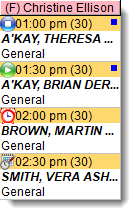
 Vera's appointment is booked but she has not yet arrived
 Martin is checked in and is waiting
  Brian is seeing a provider (service in progress)
 Theresa has seen a provider and the service finished
- In the appointment book, select the patient.
-
Click
 Check In.
- In the Service Record window, the date and time of arrival are automatically listed. Record any other information as required, including setting the priority. For more information, see Service Record - Detail.
-
Click
 Save.
Save.
The patient's status is changed to Waiting.
The other appointment status changes occur automatically when the service is started from the service record and the clinical record is closed.
To open a patient's biographic information from the appointment book, select the patient's
appointment and click  Biographics.
To view a list of all upcoming appointments for a patient, click  Services and search for the patient. Deselect
Future Only to view all appointments.
Services and search for the patient. Deselect
Future Only to view all appointments.
To take payment when a service is finished and the patient returns to reception, in the Service Recording window, double-click a patient and select Edit Service Details.