
Run the Government Reporting Tool
At reporting time, use the Government Reporting Tool (GRT) to extract the nKPI data you need from Communicare and submit it to the Department of Health Data Portal.
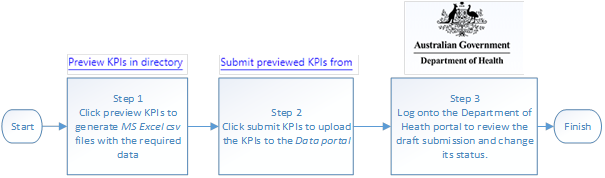
The overall process for extracting Indigenous Health Data from Communicare and
uploading the data into the Health Data Portal can be distilled into the following
steps:
- Using the Government Reporting Tool, extract data from Communicare to spreadsheets which you can review.
- Using the Government Reporting Tool, upload the KPI data to the Health Data Portal.
- In the Health Data Portal, review and confirm the submission.
To run the Government Reporting Tool on or after 1 July of each
year:
-
Double-click GovernmentReportingTool to run it.
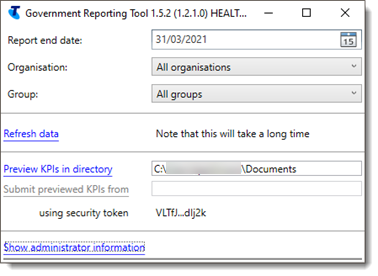
The title bar of the Government Reporting Tool displays the version of the tool, the username of the person who is logged on and the name of the computer. Check with Communicare Support that you are running the latest version.
Log onto the Commonwealth Department of Health (DoH) Health Data Portal and review the draft submission and complete the data asset upload process. When you are satisfied with the submission, change its status.
If you encounter problems using the Government Reporting Tool:
- Click Show administrator information.
- Copy or take a screen capture of all the content in the Show
administrator information pane and attach it to a ticket for
Communicare Support for resolution.Tip:Scroll down to view all data.