
Correcting Medicare Claims
If you mistakenly submit a Medicare claim to Services Australia, depending on the status of the claim in Communicare, you may be able to revoke it if you act quickly.
- Revoke the claim - preferred method, requiring quick action
- Have Medicare intercept the claim
- Amend a claim
- Have Medicare reverse payment of the claim
Check the status of the claim for the patient in the Claims Status (Online
Claiming) window. To display this window, select tab.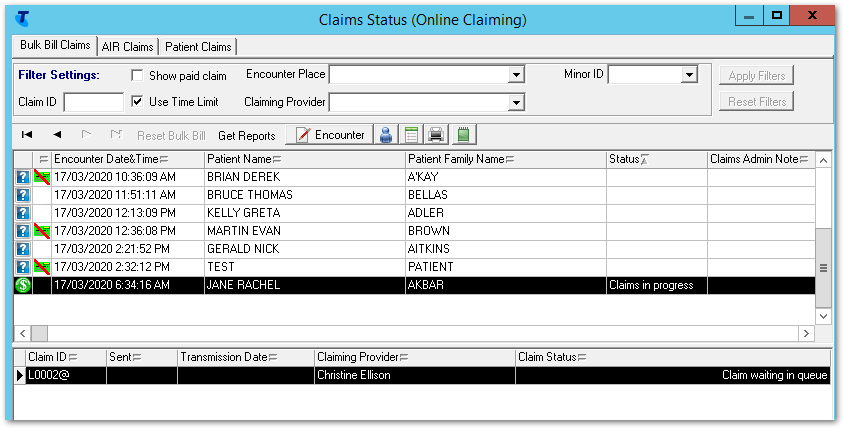
Revoking the claim
If you submit an incorrect Medicare claim and the claim has not yet been sent to Services Australia you can revoke it.
Claims are sent at the interval and times configured in CCareQueue_ServicesAustralia. By default, claims are sent hourly, 12:00-1:00pm. For more information, see Services Australia interaction defaults.
- Claim Status of Claim waiting in queue
- Claim Status of Claim sent - Awaiting processing
- In the encounter list, select the required encounter.
- Click
 Encounter.
 - In the Service Record window, Medicare tab, click Not Claimable.
- To confirm that you want to revoke the claim and make it non-claimable, click Yes.
Result: The claim is revoked and removed from the encounter list in the Claims Status (Online Claiming) window. You can now submit a claim for the correct Medicare items.
- Click
 Service
Recording.
Service
Recording. - From the Service Recording window, double-click the service record of the patient for whom you want to claim. Adjust the filters as required.
- In the Service Record window, Medicare tab, deselect This service is not claimable.
- Select the correct Medicare items.
- Click Claim now.
Intercept a claim
If you submit an incorrect Medicare claim and in the Claims Status (Online Claiming) window, the Claim Status is Claims in progress, ring Services Australia eBusiness on 1800 700 199 and ask them to intercept the claim before it is processed.
 Admin note and in the Claim Admin Notes window,
enter your notes.
Admin note and in the Claim Admin Notes window,
enter your notes.- After the 7 day period lockout period from when the claim was queued, select .
- In the encounter list, select the required encounter.
- Click Reset Bulk Bill.
- Click Encounter.
- In the Service Record window,
Medicare tab, select the correct items.Tip:You will not be able to amend or submit the claim until the 7 day lock-out period has passed.
- Click Claim now and submit the corrected claim to Services Australia.
Claims are sent at the interval and times configured in CCareQueue_ServicesAustralia. By default, claims are sent hourly, 12:00-1:00pm. For more information, see Services Australia interaction defaults.
Amend a claim
- Error: Claim not sent - please retry
- Claim rejected - View Medicare Australia Report
- Claims partially paid by Medicare Australia
- Claims rejected - View Report
 Claim status unknown
- For a claim that has a claim status of Claim rejected - View Medicare Australia Report, click View Medicare Australia Report.
- Review the report.
- Click Encounter to open the related Service
Record.
- In the Service Record window, Medicare tab, amend the MBS items; for example, deselect a failed item and select a more appropriate item.
- Click Claim now and submit the corrected claim to Services Australia.
The whole claim is resubmitted and Services Australia identifies which items are yet to be paid.
Reverse a claim
- Ring Medicare eBusiness on 1800 700 199 and ask them to reverse the payment.
- Repay Medicare for the amount of the claim.
- Submit a support request asking for Communicare Support to set that specific paid claim to unpaid in Communicare.
- If required, correct your accounts so that an incorrect amount isn't reported. For help with correcting your accounts, submit a Telstra Health Support.