
Record inventory in an ordered consolidated order
After you have saved and ordered a consolidated order, you can record the quantity of each medication request received from your supplier and track any stock yet to be received.


Use the ordered consolidated order to record medications received by you from the supplier.
-
In the Consolidated Orders summary window, double-click
the consolidated order with a status of
Ordered.
-
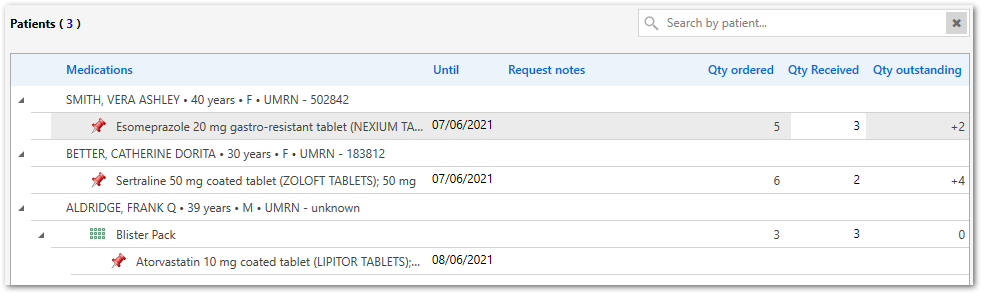
In the ordered Consolidated order window, for each
medication or DAA pack, in the Qty Received column, enter
the number of packs received from your supplier.
The value in the Qty outstanding column is updated automatically. If you receive the same number of packs as you ordered, this value will be 0. If you received fewer packs than you ordered, this value shows the number of packs that have not been supplied compared to what you ordered. If you receive additional stock, this value will be negative.
Tip:To find a particular patient, in the Search by patient field, enter any text that matches the patient's name, or their Patient ID or UMRN. To clear the search and show all medication requests, click
 Clear.
Any notes added to a medication request when prescribing are listed for each medication request.
If any part of the consolidated order is not received from the supplier and there is
an outstanding quantity recorded, the Patients section is
marked as Partially Filled
 . In the summary, the consolidated order shows a filled status of
Partial.
. In the summary, the consolidated order shows a filled status of
Partial.
In the summary, if all medication in the order has been received, the consolidated order shows a filled status of Filled. If you have also marked the order as complete, the status is Completed. The date that the order was marked as completed is recorded in the order.
You can cancel an order for whatever reason if it is no longer required. In the
Consolidated order window, click  Cancel order.