The Immunisation Vaccine
dataset is regularly updated as new immunisations are released onto the market. If your site
regularly upgrades to the latest version of Communicare you will have the most up-to-date
Immunisation Vaccine dataset.
When new immunisations are released, details about the immunisation are posted on the
User Portal. Raise a request with Communicare
Support to have your Immunisation Vaccine dataset updated.
If your site chooses to add an immunisation to the Communicare database between
upgrades, you must follow the format described below. When your site upgrades to the
latest Immunisation Vaccine dataset, and the central import disables any local terms
you have created and adds the central term. If you did not follow the format when
you created an immunisation clinical item in the local database there may be
potential impacts on reporting, such as a duplicate clinical items.
To create a new immunisation clinical item:
-
As an Administrator, select .
-
In the Clinical Item Type Maintenance window, click
 Add.
Add.
-
In the New Item: Properties window, on the
General tab:
-
In the Formal Terms field, enter
Immunisation;new_immunisation_name
For example, Immunisation;Adacel
- Use a capital letter "I" for immunisation
- Do not insert a space either side of the semi colon
- Use a capital letter for the immunisation name
-
Copy the term from the Formal Terms field to the
Natural Language field.
-
From the Class list, select
Immunisation.
-
From the Topic list, select the topic that
aligns most closely with the immunisation.
-
From the Viewing Rights list, select
Common, unless there is a compelling reason
to use a different viewing right.
-
Set Recallable to make the immunisation
recallable.
-
Set Enabled.
-
Do not set Allow Recall Expiry unless there is a
significant reason to have a recall expiry for the immunisation.
-
Set Record of occurrence to Date
only.
-
Click Advanced and provide the following
information.
-
In the Export Code field, enter the AIR export
code.
-
In the ICPC 2 Plus pane, in the
Code field, enter the ICPC-2 PLUS code.
The ICPC-2 PLUS code can be inferred from other immunisations with the
same topic in Communicare or by researching the ICPC-2 PLUS
website.
-
If the immunisation requires a definition or instruction, in the
Definition of field, enter
instructions.
-
All other fields can be left as they are, no further configuration is
required.
-
On the Keywords & Qualifiers tab, click Add to add a row, then the caret in the row and start typing the keyword
you want to add for the immunisation.
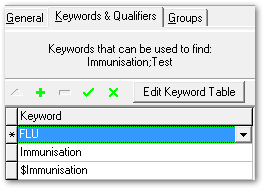
Tip: To list this new immunisation in the
Immunisation shortcut list in each patient’s
clinical record, choose $Immunisation as one of the
keywords. To display this new immunisation in the Clinical Terms
Browser when clinicians enter Immunisation as a search term,
choose Immunisation as one of the keywords.
-
Repeat step 5, adding all keywords that you think clinicians might use when
trying to find the clinical item. If the keyword you want to use is not
available, click Edit Keyword Table and add a new
keyword.
-
On the Groups tab, set any groups that apply.
-
Click Save.
The immunisation is added to the Clinical Terms
Browser. If you added $Immunisation as one of the
keywords, it is also added to the Immunisation shortcut list in
each patient’s clinical record