
Communicare Data Updater
Use the Communicare Data Updater to update Central items and other clinical data, AIR rules, templates and reports, and the GRT in your database.
Users who belong to the System Administrators user group can use
the Data Updater to update any of the following data:
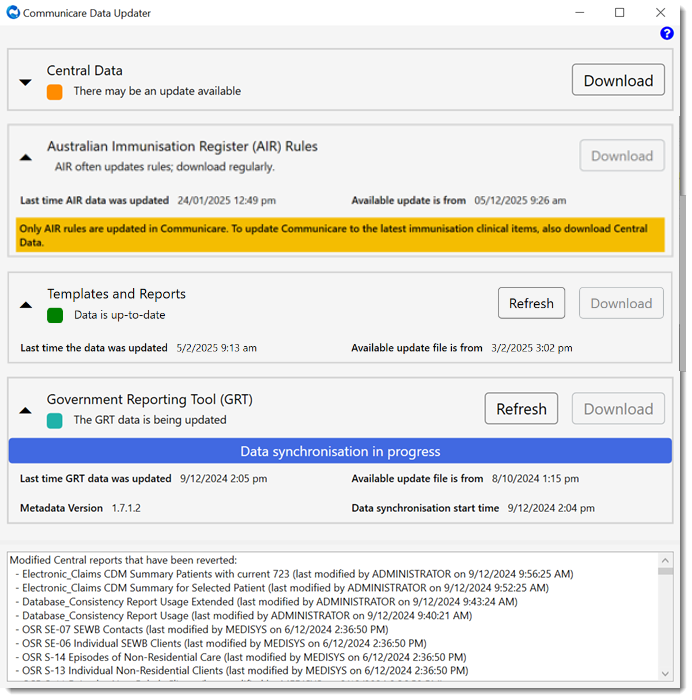
- Central Data items, including immunisation clinical items
- Australian Immunisation Register (AIR) Rules
- Templates and reports data
- Government Reporting Tool (GRT)
Update each data set by itself or in combination with other, selected data sets.
The frequency at which you run the Communicare Data Updater depends on the data that you need to update. Ideally run the Data Updater out of hours so that other users are not affected.
With the exception of AIR data, the Communicare Data Updater checks for the last time
and date that each type of data was changed in the Communicare database and sets an
update status, from the following:
 Dark red - your data is old. Update now.
 Orange - your data is irregular and there may be an update. Run the
Data Updater and attempt an update.
Orange - your data is irregular and there may be an update. Run the
Data Updater and attempt an update. Teal - your data is being updated in the background which may take
several hours. To see the latest status, click
Refresh to
Teal - your data is being updated in the background which may take
several hours. To see the latest status, click
Refresh to  Green - your data is current. No further action is required.
 Blue - the status of your data is unclear. Try again later or
contact Telstra Health
Support.
Blue - the status of your data is unclear. Try again later or
contact Telstra Health
Support. Red - cannot connect to the Communicare service. Try again later or
contact Telstra Health
Support.
Red - cannot connect to the Communicare service. Try again later or
contact Telstra Health
Support.