
Update AIR Rules
Use the Communicare Data Updater to update AIR rules to the latest version from Services Australia.
Central data changes, including AIR rules updates are included in the release notes, listed by their month of release. For more information, see Central Data Changes.
To update AIR rules:
-
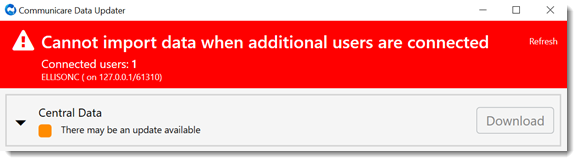
If other users are logged in, the user and their computer name are listed in a
banner. Before proceeding with the update, ensure that those users are logged
out, then click Refresh in the banner.
-
Open the Australian Immunisation Register (AIR) Rules
tile. On this tile:
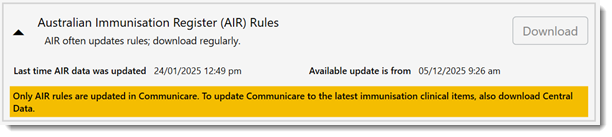
- AIR often updates rules; download regularly - versioning is not available so Communicare cannot display the status of AIR data in your database. Instead, remember to update your AIR data regularly.
- Last time AIR data was updated - displays the date and time of the latest download to your database.
- Available update is from - displays the date and time the latest rules were made available by Services Australia. Currently, Services Australia updates AIR rules every 7 days.