Replace a provider for a manual or weekly session, all appointments within a date
range or all appointments from a selected date.
To change an appointment session's provider:
-
In the Appointment Book, right-click in the session you
want to reassign and select Replace Provider.
-
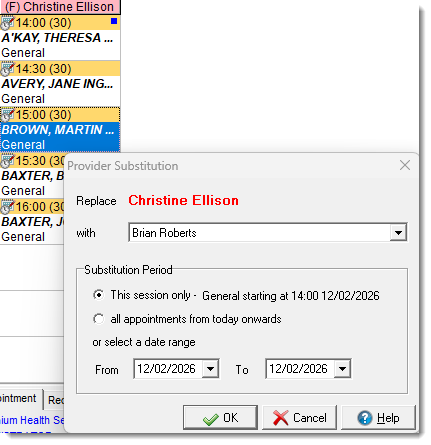
In the Provider Substitution window, from the
with list, select an alternative provider.
-
In the Substitution Period list, select how many
sessions you want to substitute. Choose from:
- This session only - the provider is substituted
for this session only.
- All appointments from today onwards - the
provider is substituted for this and all future sessions.
- Date range - the provider is substituted for the selected date
range.
-
Click
 OK.
OK.
-
Confirm the substitution.
The selected provider is substituted for the original
provider for the session or period specified, or until the horizon date if you selected
all appointments from today onwards.The session template
is not affected by changes you make in the sessions; the provider for the session
template is unchanged.
